
Settings
Notification settings
Choose how Hostly keeps you updated about invitations, event changes, planning, and chat.
Open notification settings
Open Settings, then Notifications. Each row controls a specific kind of Hostly activity.
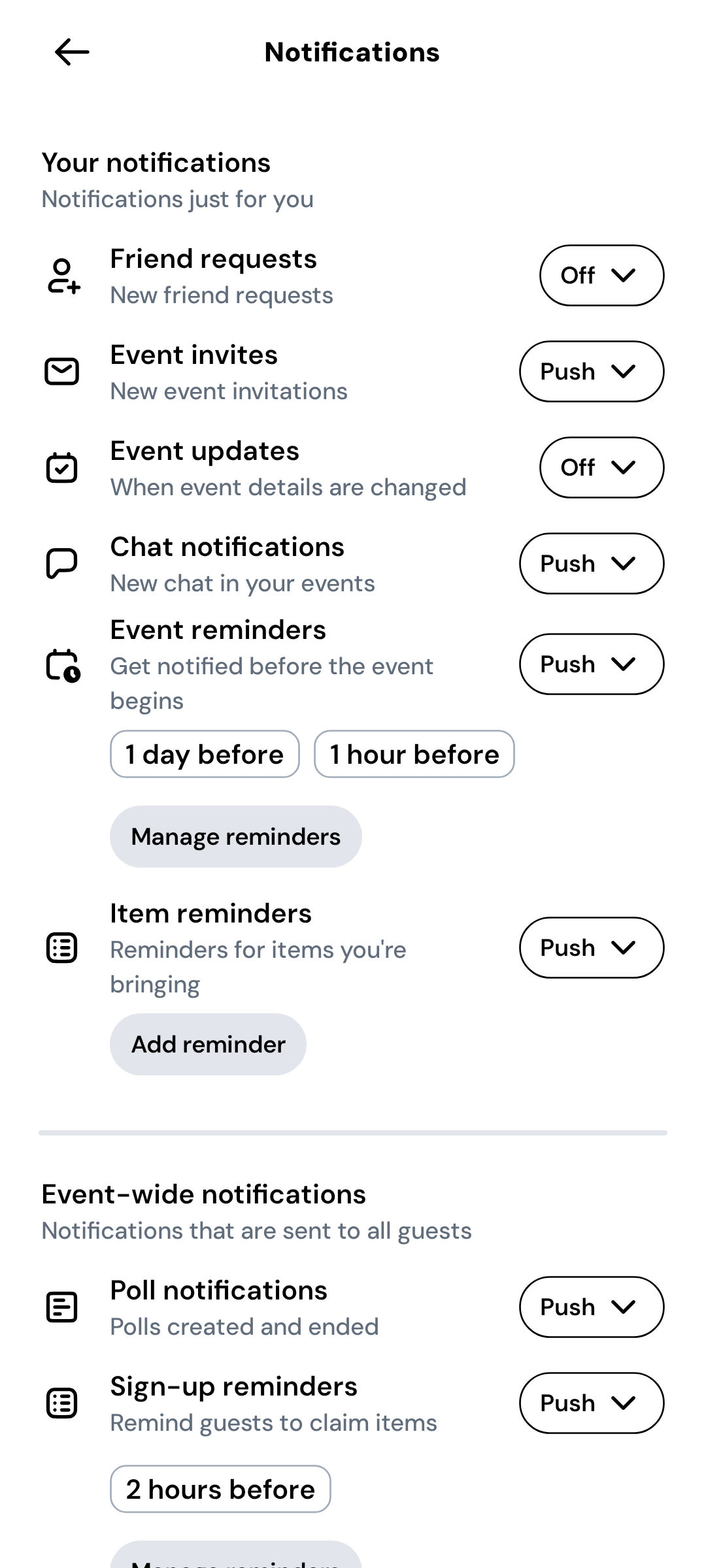
Choose the alerts you want
Set event invites, event updates, chat, reminders, and planning alerts to Push or Off. Reminder timing can be adjusted where shown.
Confirm device permission
If Push is selected but alerts do not arrive, open your phone’s system settings and allow notifications for Hostly.
Expected result
Hostly sends the selected alert types at the configured times, subject to your phone’s notification permissions.Platform notes
Before you continue
Open iPhone Settings → Notifications → Hostly and allow notifications.
Open Android Settings → Apps → Hostly → Notifications and allow the relevant categories.
Troubleshooting
If something does not look right
Push is on but no alerts arrive
Check system permission, battery restrictions, Focus or Do Not Disturb, and whether you are signed into the expected Hostly account.
Too many alerts arrive
Turn off only the noisy category instead of disabling all Hostly notifications at the system level.
Understand how it works
Hostly concepts behind this task
Allow device notifications
Hostly needs operating system permission before push notifications can appear. If permission is off, preferences selected inside Hostly cannot override the device setting.
Choose useful categories
Review the available notification categories and decide which invitations, event changes, planning updates, and conversations should reach you. Keep essential event changes on while reducing categories that are less time-sensitive.
Control an event or chat
A specific event or event chat can offer its own notification behavior. Use these controls when one especially active plan is noisy but you still want normal notifications elsewhere.
Understand reminders
Reminders and notifications work together but serve different purposes. Reminder settings choose when you should be prompted; notification permission and categories determine whether that prompt can be delivered.
Troubleshoot missing updates
Confirm you are signed into the expected account, the relevant Hostly category is enabled, and device permission is allowed. Device-level focus or battery settings can also delay or suppress alerts.
Common questions
Quick answers
Can hosts force notifications on for guests?
No. Each person controls their own notification and device settings.
Article feedback